
Accepting the first crypto payment is only the start for a subscription business. The real operational challenge is handling every renewal that follows: creating the next invoice, sending it to the right customer, tracking the payment, and keeping the subscription up to date. As the subscriber base grows, repeating those steps manually becomes difficult to manage.
NOWPayments Email Subscriptions automate this recurring invoice flow. Businesses can create a subscription plan once, add subscribers by email, and reuse the same billing terms for future renewals, while subscribers continue approving each crypto payment themselves.
This guide covers both ways to manage email subscriptions with NOWPayments: directly through the dashboard or through the API as part of your own product flow.
Explore NOWPayments Crypto Subscriptions
Why recurring crypto billing needs a different workflow
A regular crypto payment has a clear conclusion. The customer receives a payment request, sends the funds, and completes the transaction.
A subscription continues after that transaction. Without a recurring billing workflow, every new period may require the business to:
- create another invoice
- send payment information to the customer
- match the payment to the right subscriber
- check whether the required amount was received
- update the customer’s subscription
- repeat the same process at the next billing date
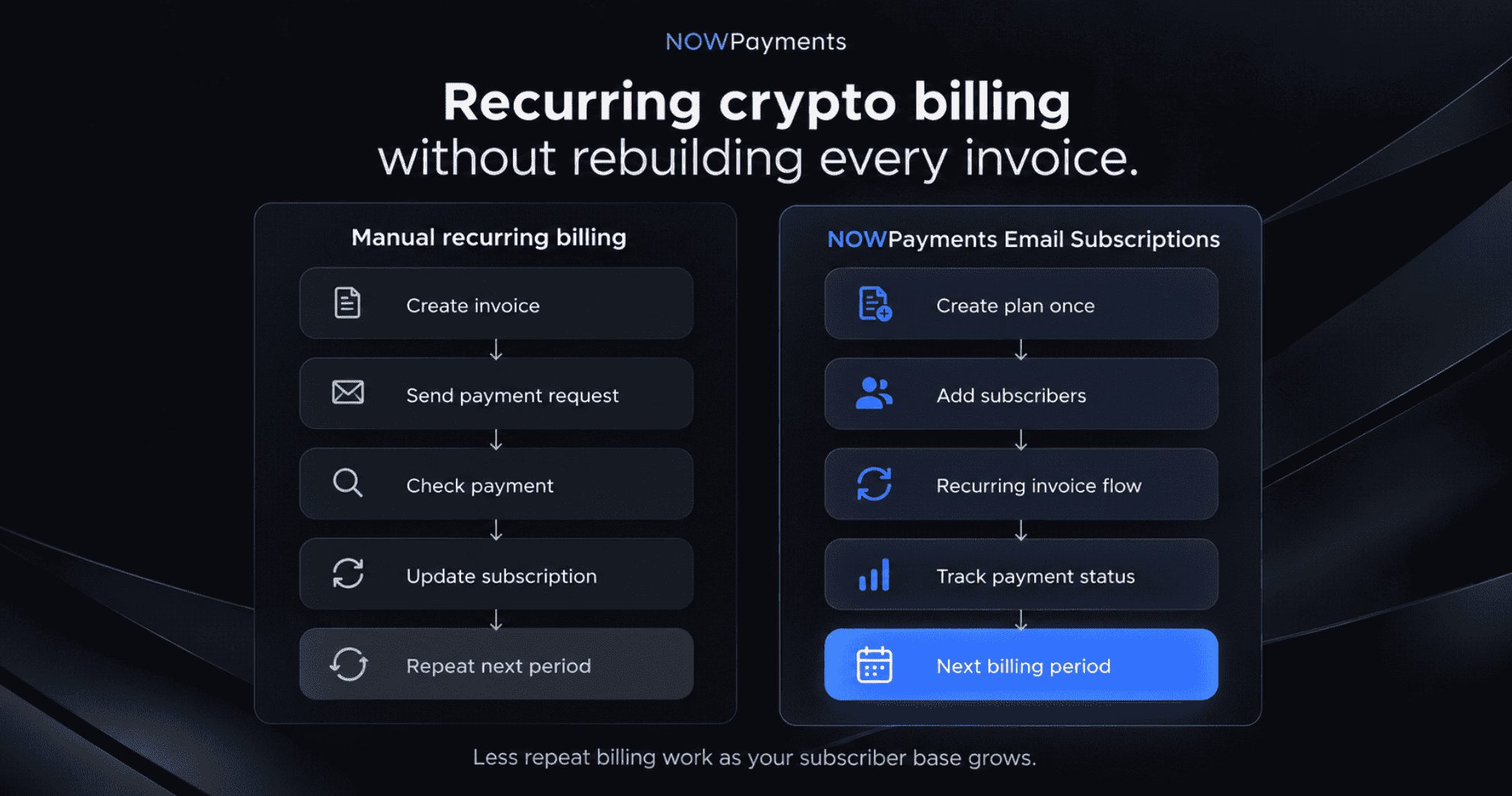
That work becomes harder to manage as the number of subscribers and renewal dates increases.
Email subscriptions turn those repeated tasks into a defined billing process. The business sets the payment conditions once and reuses the same plan across future billing periods, so recurring revenue does not require rebuilding the payment flow every time a customer renews.
Two ways to manage NOWPayments Email Subscriptions
Businesses can manage email subscriptions directly in the NOWPayments dashboard or connect the same recurring billing logic to their own product through the API.
| Dashboard flow | API flow | |
| Best for | Teams managing subscriptions directly | Businesses embedding billing into their own product |
| Create plans | In the NOWPayments dashboard | Through API |
| Add subscribers | Add customer emails from the plan | Create email subscriptions programmatically |
| Manage subscriptions | Review plans, subscribers, and statuses | Retrieve and manage subscriptions through API |
| Payment updates | Check statuses in the dashboard | Receive updates through API and IPN |
Both approaches solve the same recurring billing problem. The difference is where the workflow is managed: inside NOWPayments or inside the merchant’s own system.
Dashboard flow
Create a subscription plan in the NOWPayments dashboard
Use the dashboard flow when your team wants to create and manage subscription plans directly from the NOWPayments account.
Go to:
- Payment tools → Subscriptions
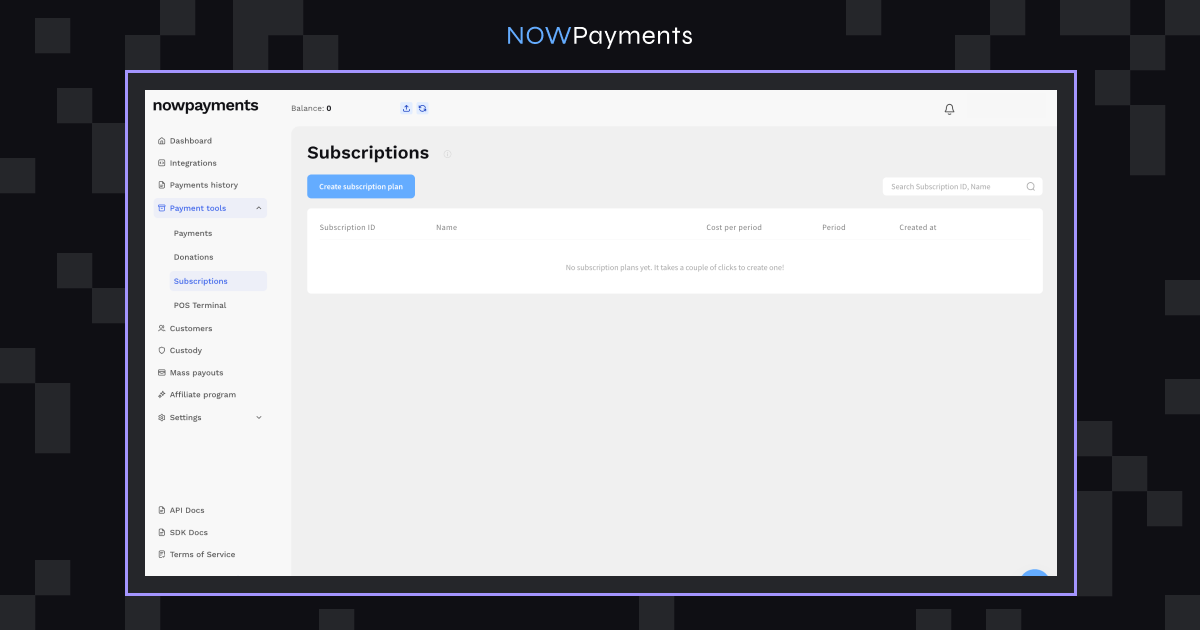
The Subscriptions page shows the plans connected to your account, including:
- Subscription ID
- Name
- Cost per period
- Period
- Created at
You can also search for a plan by its Subscription ID or name.
Click Create subscription plan to create a new plan.
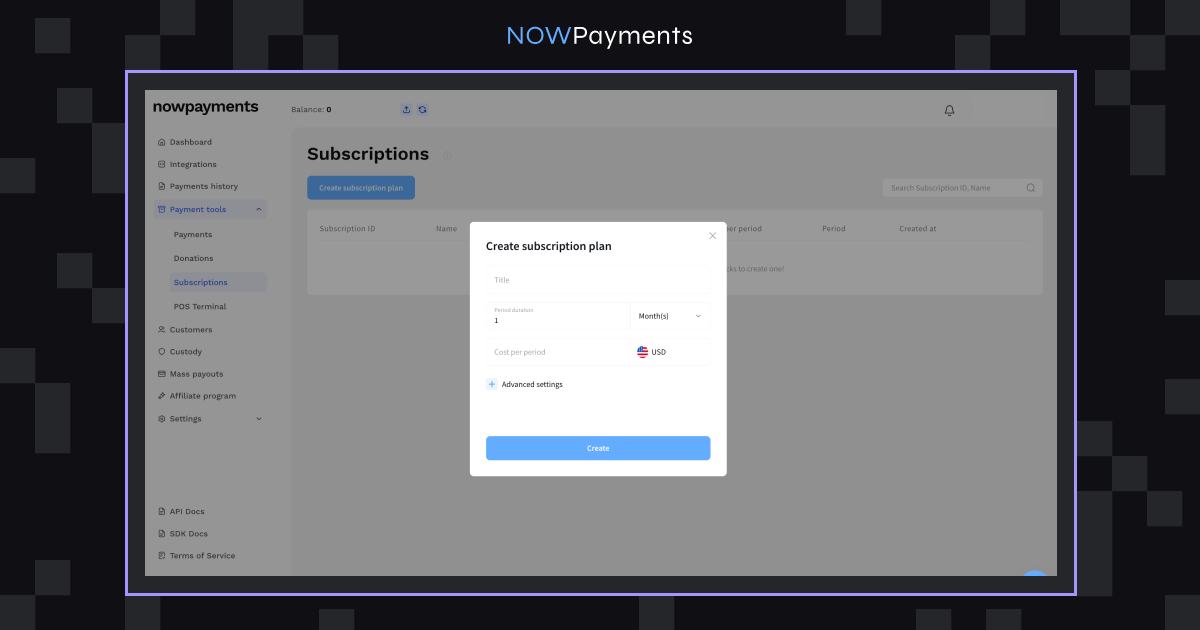
Step 1. Set the plan terms.
A subscription plan defines the billing conditions that will be reused for future payments.
| Setting | What it defines | Example |
| Name | How you identify the plan | Pro Monthly |
| Cost per period | Amount due each billing period | $29 |
| Period | How often another payment becomes due | 30 days |
| Currency | Currency used to define the subscription price | USD |
For example, a SaaS company can create one Pro Monthly plan for $29 every 30 days and use it for every customer on that pricing tier.
The reusable plan removes the need to enter the same billing conditions for each subscriber and each renewal.
Step 2. Save the plan
Once created, the plan receives its own ID and appears in the Subscriptions section.
The plan stores the billing rules, while individual subscribers are connected to it separately.
Read the NOWPayments Recurring Payments API guide
Step 3. Add subscribers through the dashboard
Once the plan is ready, open it and add the customers who should receive its recurring invoices.
The subscriber’s email address is connected to the price and billing interval already stored in the plan. For example, [email protected] can be added to the existing Pro Monthly plan without creating a separate billing setup.
The NOWPayments Crypto Subscriptions page describes the same model: create a plan, add subscribers by email, and use that setup for recurring invoices.
This structure becomes more useful as the customer base grows. A business can maintain a small set of reusable plans instead of creating separate billing conditions for every subscriber.
What happens when a subscriber needs to pay
Whether the subscription was created through the dashboard or API, the customer follows the same payment flow.
When another payment becomes due, the subscriber receives an email containing a payment link.
The customer opens the link and completes the crypto payment through the payment page. They remain in control of their wallet and approve each transaction themselves.
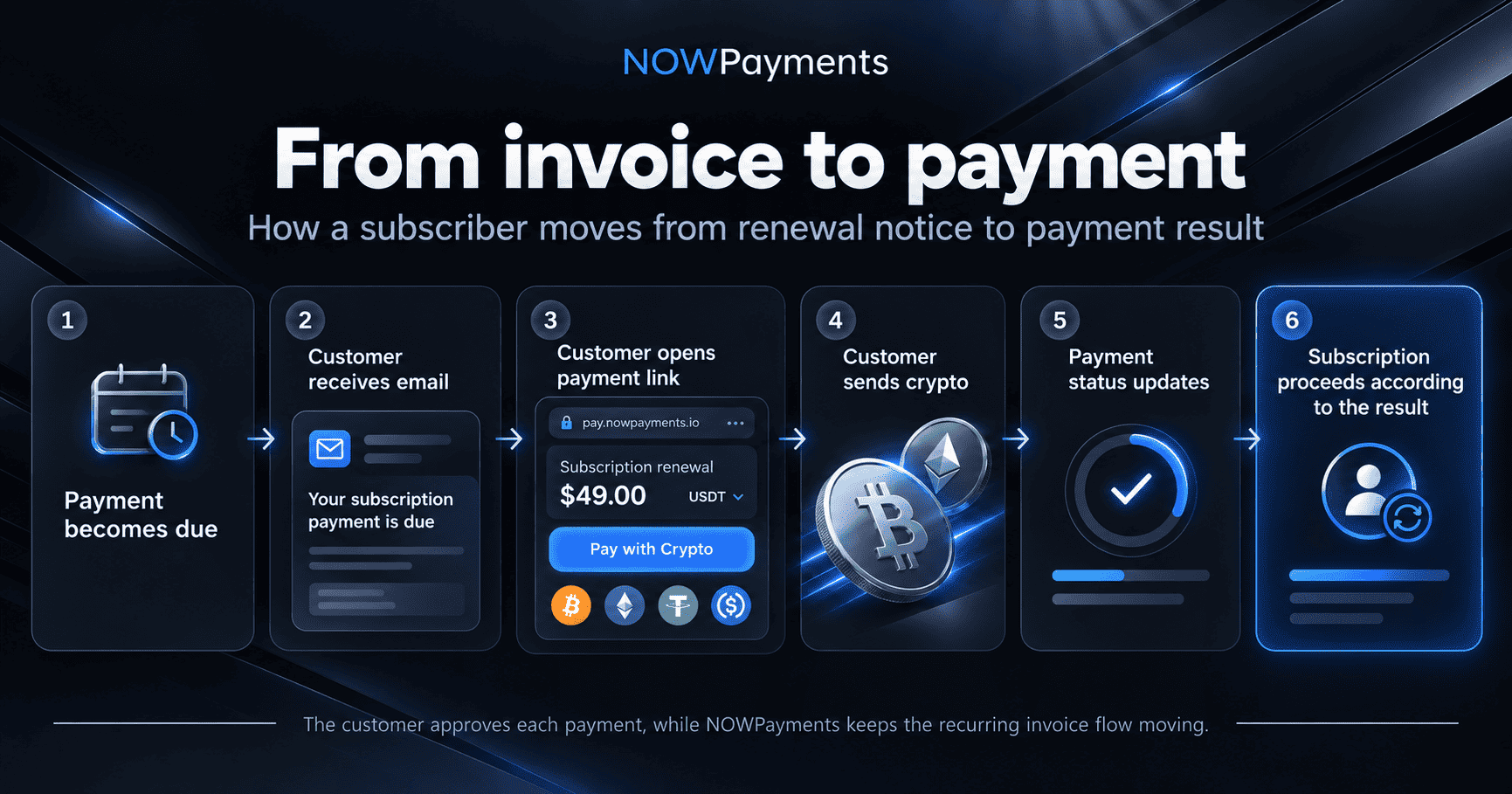
Email subscriptions automate the recurring invoice process rather than creating an automatic debit from an external wallet. For the merchant, that removes the need to prepare and send the next payment request manually every time another billing period starts.
Businesses that prefer stablecoin-based payment flows can also build their subscription setup around assets such as USDT or USDC on supported networks.
How payment status affects the subscription
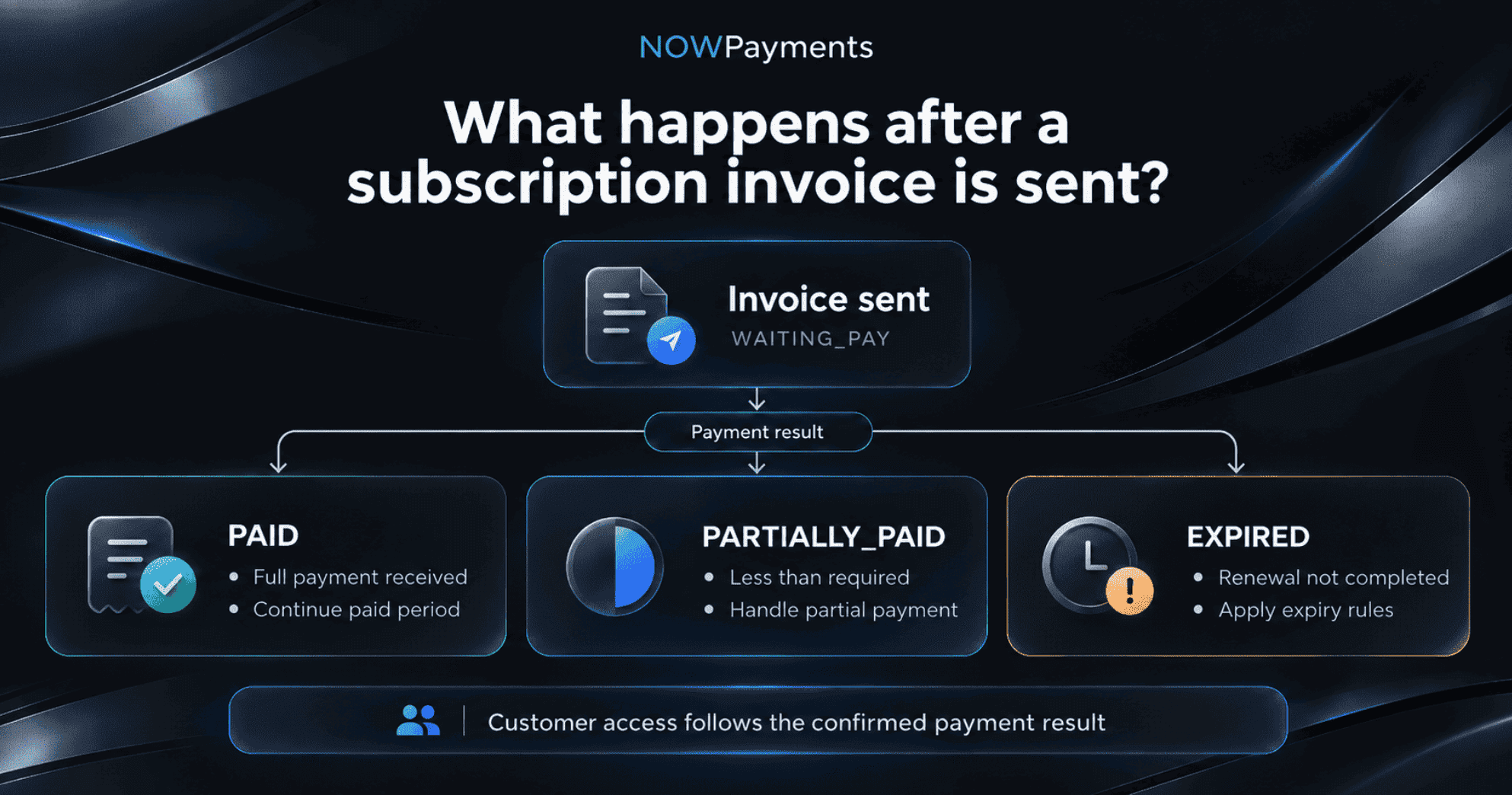
Creating an invoice does not mean that the renewal has been completed. The payment result determines what happens next.
NOWPayments recurring payment flows use subscription statuses such as WAITING_PAY, PAID, PARTIALLY_PAID, and EXPIRED.
| Subscription status | What it means | What the business can do |
| WAITING_PAY | The required payment has not been completed. | Keep the renewal pending. |
| PAID | The subscription payment was completed. | Continue the paid period. |
| PARTIALLY_PAID | Less than the required amount was received. | Apply the business’s partial payment rules. |
| EXPIRED | The renewal remained unpaid and expired. | Apply the business’s expired subscription rules. |
The underlying transaction also has its own payment status lifecycle. See the NOWPayments payment status guide for the full list of payment states.
Subscription statuses help the business distinguish successful renewals from incomplete ones without checking every invoice manually. They can also be used by the merchant’s own product to control customer access.
How subscription renewals work
As the current paid period approaches its end, another payment request is prepared for the subscriber. The customer receives a fresh payment link and can complete the next renewal.
NOWPayments recurring payment materials describe the same process: another payment link is sent before the current paid period ends.
This is where the workflow becomes more useful as the subscriber base grows. The number of renewals may increase, but the team does not need to recreate the same invoice process at the same rate. The plan remains in place while subscribers move through their own billing cycles.
Manage plans and subscribers in the dashboard
Once subscriptions are active, the challenge changes from setting up billing to managing the subscriber base.
| Action | When it is useful |
| Find a plan | Locate an existing subscription by ID or name |
| Review subscribers | See customers associated with a plan |
| Check status | Confirm whether a renewal has been completed |
| Update a plan | Change conditions for future payments |
| Deactivate a subscription | Stop an individual subscriber from continuing |
Changes to an existing plan can be used for future payments without rewriting periods that have already been paid.
Before building deactivation into a live support process, it is worth checking how subscription and payment history are displayed afterward in the current dashboard.
API flow
Automate Email Subscriptions through the API
Use the API flow when recurring billing needs to become part of your own signup, billing, or customer management process.
Instead of managing every action manually in the dashboard, your product can create and manage subscriptions programmatically.
For example, a SaaS platform could:
- identify the plan selected during signup
- create or select the corresponding subscription plan
- connect the customer’s email to that plan
- receive payment status updates
- update the customer’s account after payment
The main recurring payment API methods include:
| Action | API method |
| Create a plan | POST /v1/subscriptions/plans |
| Update a plan | PATCH /v1/subscriptions/plans/:plan-id |
| Get one plan | GET /v1/subscriptions/plans/:plan-id |
| Get all plans | GET /v1/subscriptions/plans |
| Create an email subscription | POST /v1/subscriptions |
| Get recurring payments | GET /v1/subscriptions |
| Get one subscription | GET /v1/subscriptions/:sub_id |
| Delete a subscription | DELETE /v1/subscriptions/:sub_id |
You can find these methods in the Recurring Payments API guide and the full NOWPayments API documentation.
The API flow solves the same recurring billing problem as the dashboard flow but keeps subscription logic inside the merchant’s own product. This fits the wider NOWPayments infrastructure model, where payments, payouts, conversions, and treasury workflows can connect with existing business systems.
Receive subscription payment updates with IPN
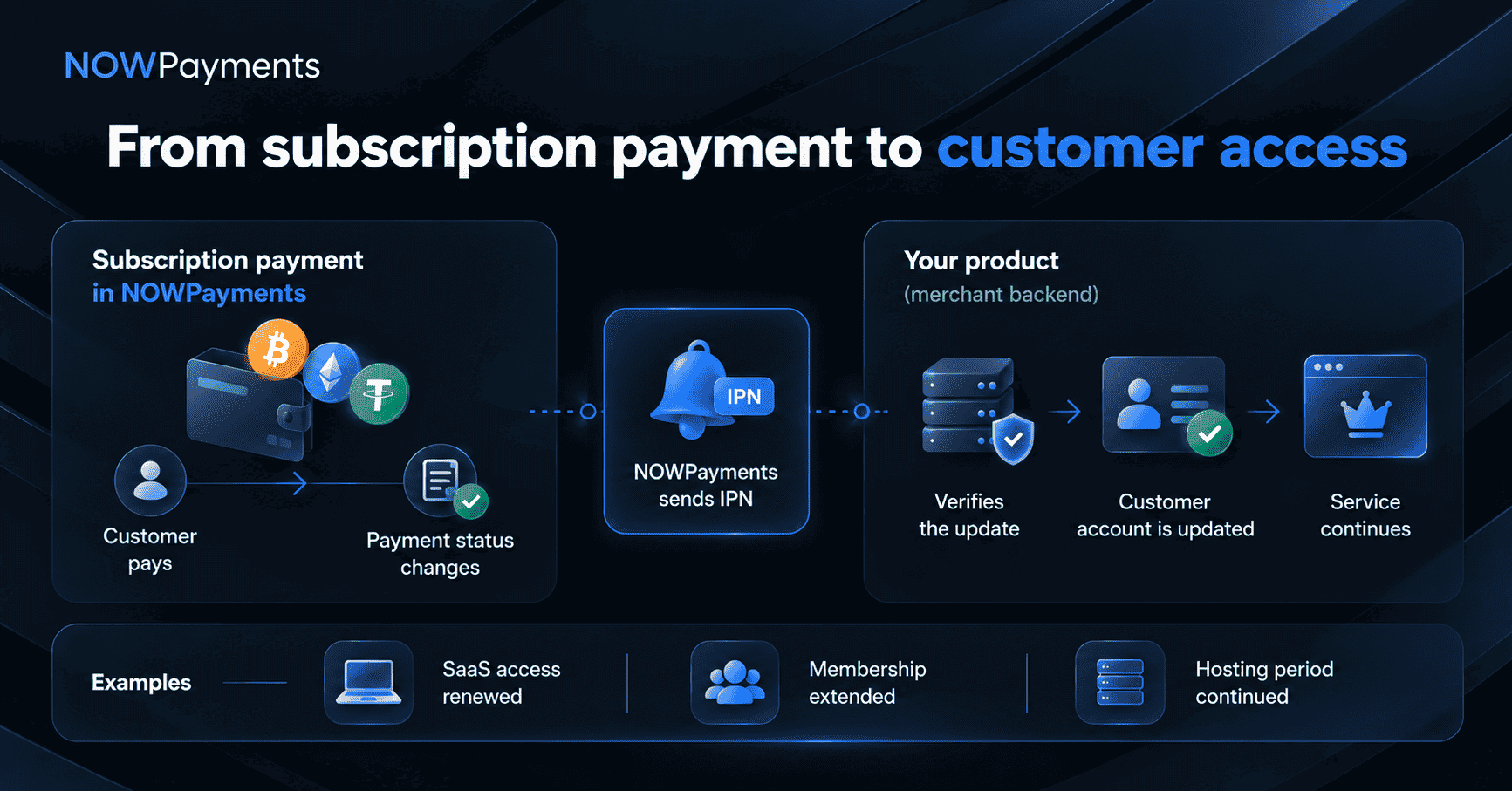
Creating and tracking a subscription through the API is only part of the integration. The merchant’s own system also needs to know what happened after the customer pays.
That update can trigger an action such as renewing customer access or changing the next expiration date. Without this connection, a team may still need to check payment results and update accounts manually.
NOWPayments uses Instant Payment Notifications, or IPNs, to send transaction status updates to the merchant’s server. The merchant can verify those notifications using its IPN secret key.
Subscription plans can also use:
- ipn_callback_url
- success_url
- cancel_url
- partially_paid_url
These fields connect the payment flow with the merchant’s application and define how different checkout outcomes are handled.
Learn how NOWPayments IPN works
Businesses setting up their first integration can also use the NOWPayments guides for creating an API key and the main Payments API.
Which businesses benefit from Email Subscriptions?
Email subscriptions fit businesses where customers pay on a regular schedule but still approve each crypto payment themselves.
| Business model | Example recurring charge |
| SaaS | Monthly or annual software access |
| Hosting and infrastructure | VPS, server, or cloud service |
| Memberships | Monthly or quarterly access |
| Digital services | Ongoing tools, content, or services |
| Professional services | Regular retainer |
| Creator communities | Premium content or paid community access |
The industries differ, but the business problem is similar: recurring revenue should not require the team to rebuild the payment process for every customer and every billing period.
Email subscriptions are most useful when the company wants to scale recurring crypto revenue while customers continue approving their own transactions.
What does it cost to process subscription payments?
Email Subscription invoices follow standard NOWPayments payment pricing.
Single currency payment processing typically costs 1%, while eligible businesses can receive individually agreed rates starting at 0.3%. Additional conversion or blockchain network costs depend on the payment flow and network used.
For smaller recurring charges, network choice can matter because a blockchain fee represents a larger share of a small subscription payment than of a larger transaction.
See current NOWPayments pricing
Subscription setup checklist
Before using email subscriptions with live customers, test the flow that matches your setup.
For dashboard-managed subscriptions:
- Create the plan with the intended amount and billing interval.
- Add a test subscriber and check that the payment email arrives.
- Complete a payment and verify the subscription status.
- Test the next renewal cycle.
- Test subscription deactivation and check what history remains visible.
For API-integrated subscriptions:
- Confirm the correct plan and subscriber are created through API.
- Test payment status retrieval.
- Verify IPN delivery and signature validation.
- Confirm your product updates customer access correctly.
- Test partial or unpaid renewal scenarios.
Testing the full lifecycle helps catch issues that are easy to miss when only the first invoice is checked.
Conclusion
The harder part of subscription billing is not collecting the first crypto payment. It is managing every renewal that follows without letting manual work grow together with the subscriber base.
NOWPayments Email Subscriptions give businesses two ways to solve that problem. Teams can manage recurring billing directly through the dashboard, while businesses that need deeper automation can connect subscriptions to their own product through API and IPN.
As part of the wider NOWPayments crypto business ecosystem, the same infrastructure can also connect with stablecoin flows, payouts, conversions, and treasury operations as the business grows.
Explore NOWPayments Crypto Subscriptions
FAQ
What are NOWPayments crypto subscriptions?
NOWPayments Email Subscriptions let businesses create recurring payment plans and connect customers to them by email. When another payment becomes due, the subscriber receives a payment link and completes the crypto payment.
Can NOWPayments automatically charge a customer’s crypto wallet?
No. Email Subscriptions automate recurring invoice creation and delivery, not withdrawals from an external crypto wallet. The subscriber still approves each crypto payment themselves.
How does a customer pay for a crypto subscription?
The customer receives an email with a payment link, opens the payment page, and sends the required crypto amount from their wallet.
Can I create monthly crypto subscriptions?
Yes. Subscription plans use a defined billing interval, so businesses can set recurring periods that match their service, including monthly billing. At API level, the interval is configured with interval_day.
What happens if a crypto subscription payment is partial or missed?
A payment below the required amount can receive the PARTIALLY_PAID status. If the required payment is not completed, the subscription does not move into another paid period and can eventually expire.
Can I manage NOWPayments Subscriptions via the API?
Yes. The NOWPayments Recurring Payments API supports creating and updating plans, adding email subscribers, retrieving recurring payments, and deleting subscriptions. IPN callbacks can also send payment status updates to the merchant’s backend.