
Crypto payments should not be a long development project. Every extra day spent on integration means more engineering cost, plus another day before the business can start processing crypto transactions.
A raw API gives developers full control, but common payment flows often require more manual work. The NOWPayments Node.js SDK packages common payment operations into ready methods, giving Node.js teams a shorter path to a working crypto checkout.
In this tutorial, we will compare the SDK with a direct NOWPayments Payments API integration and then use the SDK to build a checkout, send a customer to the payment page, and confirm the payment on the server.
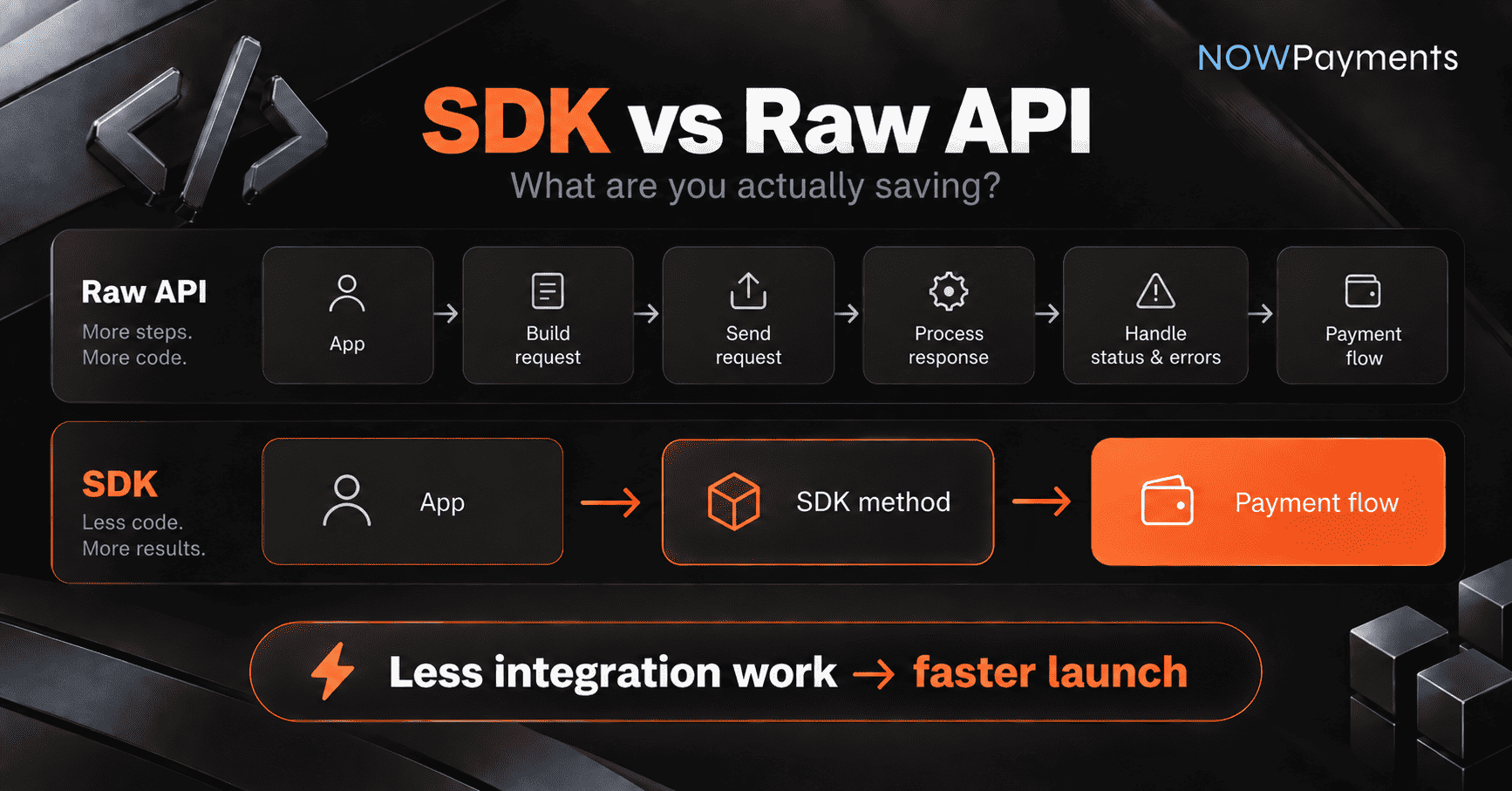
SDK vs. raw API: what are you actually saving?
An SDK does not replace the API. It gives developers a ready interface for working with it.
With a raw API integration, your application communicates directly with individual endpoints. Your developers build the requests, process the responses, handle errors, and connect each operation to the rest of the application.
With the SDK, common operations are available as Node.js methods.
| Task | Raw API | NOWPayments Node.js SDK |
| Create a checkout | Build and send the API request | Call createCheckout() |
| Create a direct payment | Build the payment request | Call createDirectPayment() |
| Work with responses | Process API responses yourself | Work with SDK response objects |
| Track payment status | Build status checks around the API | Use SDK status methods or IPN |
| Handle common errors | Add handling around API responses | Use SDK error handling |
| Add payouts | Connect the required payout operations | Use payout methods from the same SDK |
| Control individual API requests | Full control | Use the raw API when needed |
For a business, development time is also a cost. If the SDK already supports the payment flow you need, developers have less integration code to build and maintain, which can shorten the time between deciding to add crypto payments and actually launching them.
What we are going to build
We will start with a hosted checkout because it requires less payment UI work inside the application.
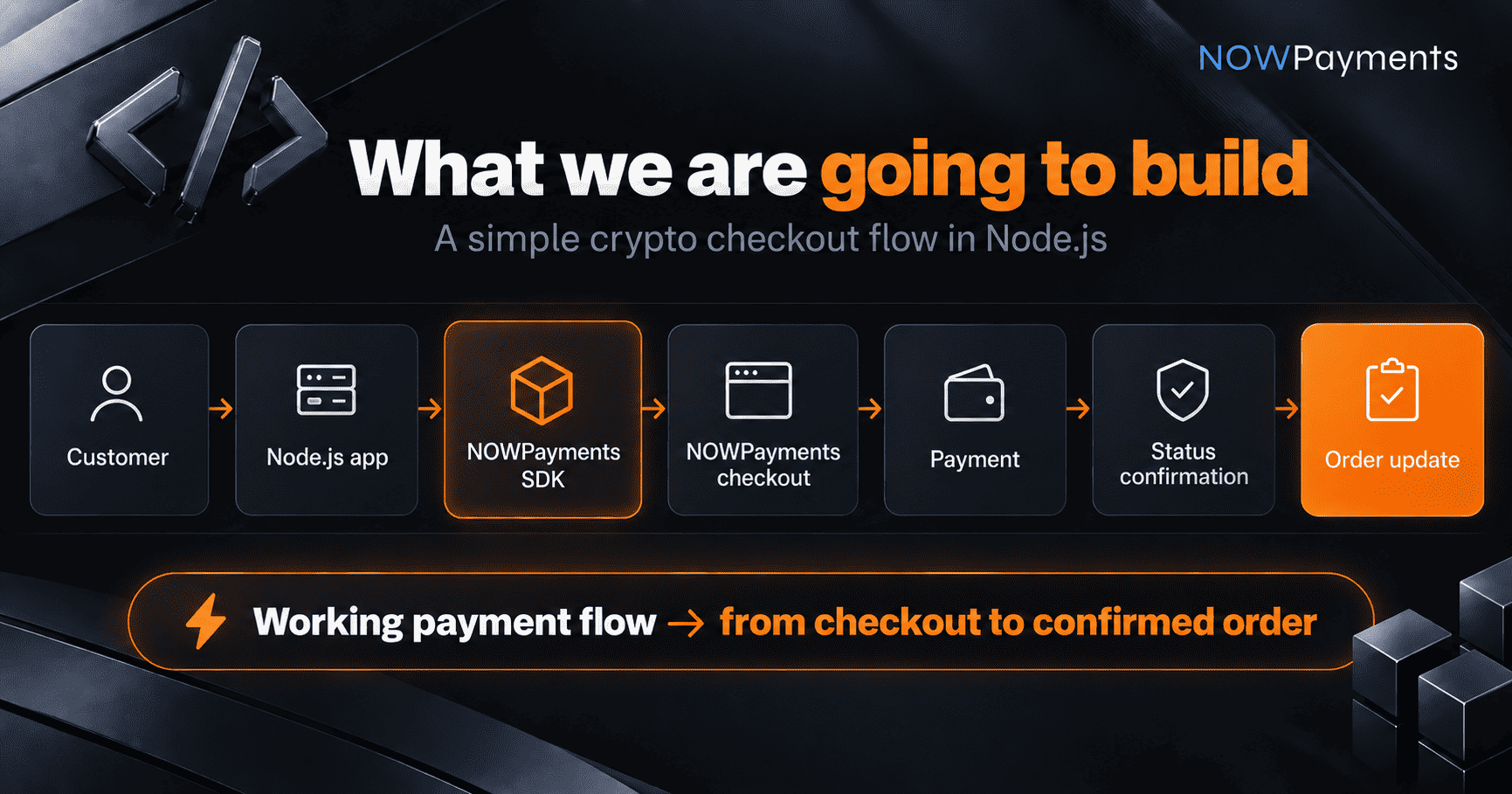
NOWPayments hosts the payment page. Your application creates the checkout, sends the customer to the returned URL, and handles the payment result.
You can also see the flow in the NOWPayments SDK Demo.
Before you start
Make sure your Node.js project and NOWPayments account are ready.
| Requirement | Why you need it |
| Node.js 18 or later | Required by the current Node.js SDK |
| npm | Installs the SDK package |
| NOWPayments account | Gives you access to payment settings |
| Payout wallet | Defines where you want to receive funds |
| API key | Connects your server to NOWPayments |
| IPN Secret Key | Helps verify payment status notifications |
Add your payout wallet under Settings → Payments → Payout wallets in the NOWPayments dashboard.
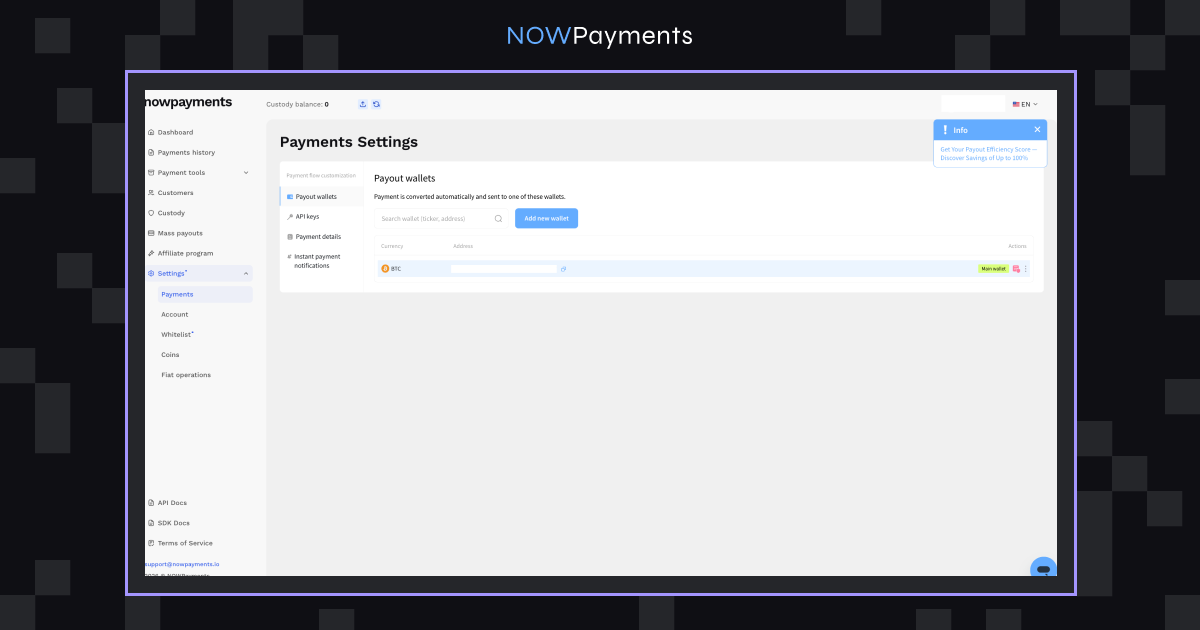
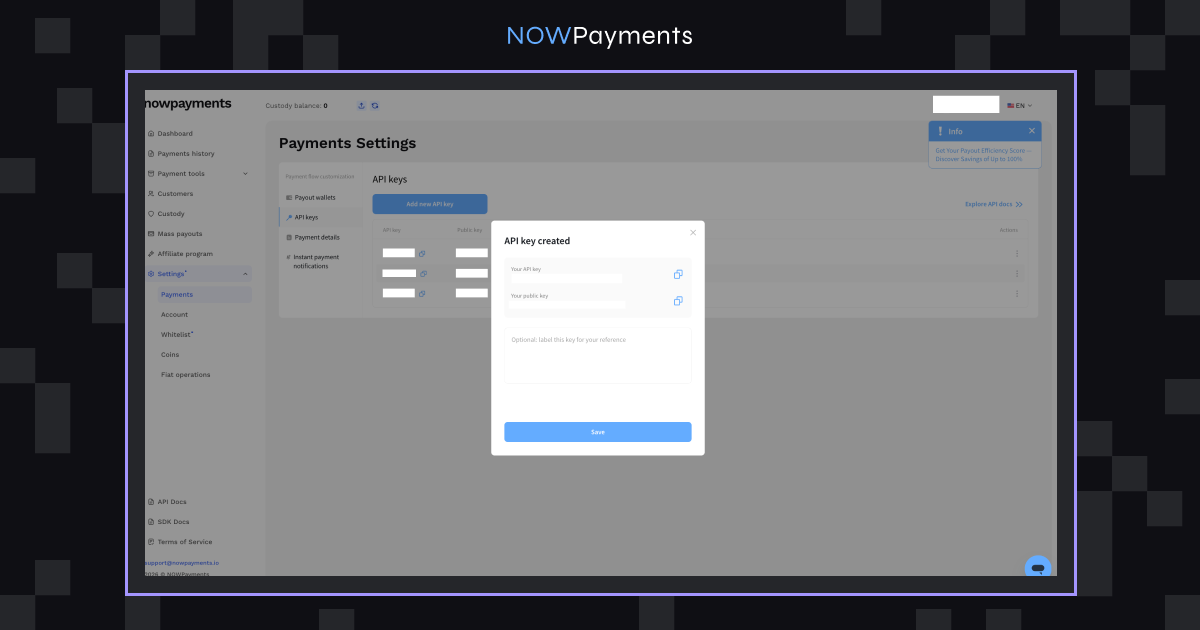
Create or copy your API key under Settings → Payments → API keys. Keep the key on the server and never expose it in frontend JavaScript.
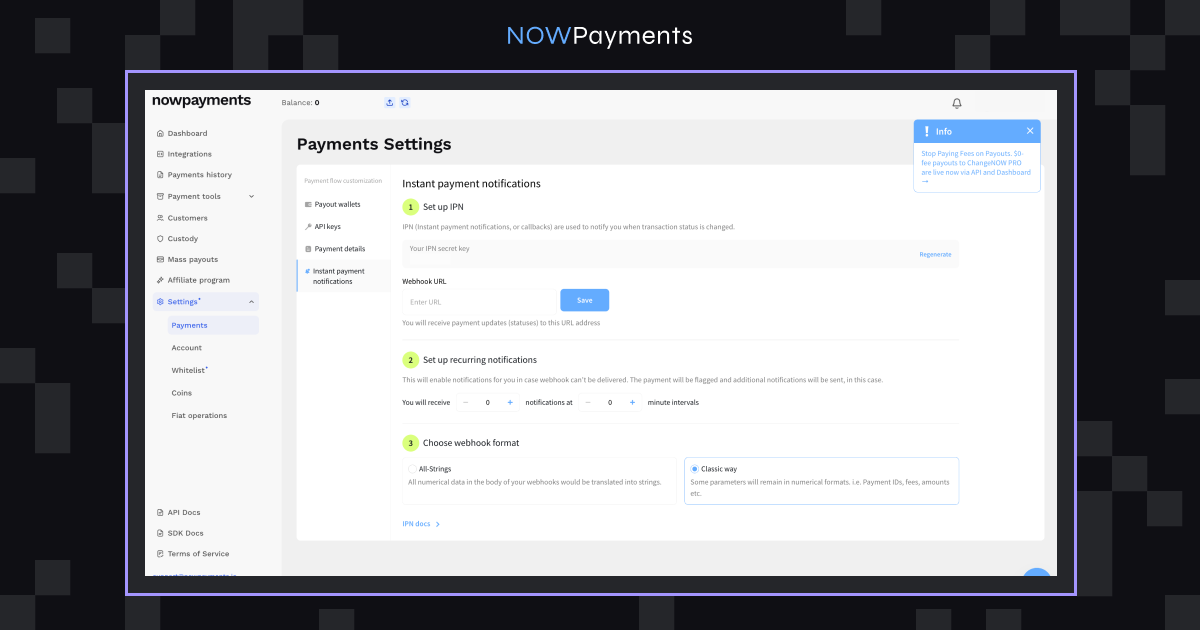
The IPN Secret Key is available under Settings → Payments → Instant payment notifications. Your app uses it to verify the payment status notifications sent to your webhook.
If your account is not set up yet, the NOWPayments Integration Guide has the main setup steps.
Step 1: Install and configure the SDK
Install the package in your Node.js project:
npm install @nowpaymentsio/nowpayments-sdk-nodejsThe current SDK requires Node.js 18 or later and uses ESM.
Keep your credentials outside the application code:
NOWPAYMENTS_API_KEY=your_api_key

NOWPAYMENTS_IPN_SECRET=your_ipn_secret
Then initialize the SDK on the server:
import { NowPaymentsSDK } from '@nowpaymentsio/nowpayments-sdk-nodejs';

const sdk = new NowPaymentsSDK({

  apiKey: process.env.NOWPAYMENTS_API_KEY,

  ipnSecret: process.env.NOWPAYMENTS_IPN_SECRET,

  ipnCallbackUrl: 'https://example.com/webhooks/nowpayments',

  successUrl: 'https://example.com/payment/success',

  cancelUrl: 'https://example.com/payment/cancel'

});
The URLs have different jobs:
- ipnCallbackUrl receives payment status updates on the server.
- successUrl is where the customer returns after completing the checkout.
- cancelUrl is used when the customer cancels the payment.
Keep your credentials on the server and outside your repository. Current installation details and configuration options are available in the NOWPayments Node.js SDK repository.
Step 2: Create a checkout
Now create a hosted checkout with createCheckout():
const checkout = await sdk.createCheckout({

  amount: 49.99,

  currency: 'usd',

  payCurrency: 'btc',

  orderId: 'order-1001',

  description: 'Demo order'

});

console.log(checkout.invoice_url);
The method returns the invoice information your application needs for the next step.
| Parameter | What it means | Example |
| amount | Order value | 49.99 |
| currency | Currency used to price the order | USD |
| payCurrency | Cryptocurrency used for payment | BTC |
| orderId | Your internal order reference | order-1001 |
| description | Optional payment description | Demo order |
Use payCurrency when you want to set the cryptocurrency in advance. If it is left out in the hosted checkout flow, the customer can choose a supported currency on the payment page.
Two values are especially useful here:
- checkout.id identifies the invoice.
- checkout.invoice_url is the URL of the payment page.
Now you can send the customer to that URL.
Step 3: Send the customer to the payment page
Once the checkout exists, the backend can return its URL to the frontend.
A simple Express route can look like this:
app.post('/checkout', async (req, res) => {

  const checkout = await sdk.createCheckout({

    amount: 49.99,

    currency: 'usd',

    orderId: `order-${Date.now()}`,

    description: 'Node.js demo order'

  });

  res.json({

    checkoutUrl: checkout.invoice_url

  });

});
The flow is simple:
- The customer clicks the checkout button.
- The frontend calls /checkout.
- The Node.js server creates the checkout.
- NOWPayments returns invoice_url.
- The frontend opens the payment page.
- The customer completes the payment.
The redirect itself can be:
window.location.href = data.checkoutUrl;The customer can now make the payment. Your app still has to confirm the result before it updates the order.
Step 4: Confirm the payment on the server
The customer landing on the success URL is not enough to mark the order paid. The redirect is part of the checkout flow but doesn’t mean the blockchain payment was successful.
Payment confirmation should happen on the server.
There are two common options:
| Method | How it works | Best use |
| IPN / webhook | NOWPayments sends a status update to your server | Normal production flow |
| Status polling | Your application checks the payment status at intervals | Testing or simpler flows |
For most production integrations, IPN is the more practical option. NOWPayments will make a callback to the URL specified in ipnCallbackUrl upon change of a payment status. Your application verifies the notification with the IPN Secret Key and updates the matching order.
The NOWPayments IPN guide explains this process in more detail.
A payment can pass through several states before it is complete. A simple successful path might look like this:
pending → processing → paid
Your application should also be ready for payments that expire, fail, or are only partially paid.
The SDK can provide the payment information, but your application still decides what each status should do to the related order.
Need more control over the checkout? Use a direct payment
Using an SDK does not mean that customers have to use a hosted NOWPayments page.
The SDK also provides createDirectPayment() for applications that want to show payment details inside their own interface.
There are two separate choices here:
- SDK vs. raw API decides how your application connects to NOWPayments.
- Hosted checkout vs. direct payment decides how the customer sees and completes the payment.
| Category | Hosted checkout | Direct payment |
| Payment UI | Hosted by NOWPayments | Built into your application |
| Setup | Simpler | More customizable |
| Customer redirect | Yes | Usually no |
| Payment details | Shown on the hosted page | Shown inside your interface |
| Best for | Faster implementation | Custom payment experiences |
A direct payment can be created through the same SDK:
const payment = await sdk.createDirectPayment({

  amount: 49.99,

  currency: 'usd',

  payCurrency: 'btc',

  orderId: 'order-1001'

});
Your application receives the payment information and decides how to present it to the customer.
Examples for both payment flows are available in the NOWPayments Node.js SDK repository.
When should you use the raw API instead?
The SDK is often the easiest path, but it’s not for every project.
Go with the Node.js SDK if:
- the backend runs Node
- it covers the flow needed
- it avoids writing the same request and response code over and over
- getting the flow working sooner matters
Go with the raw Payments API if:
- the stack isn’t Node
- an API layer is already in place
- direct control over each request is needed
- the flow isn’t covered by the SDK
The choice is not about one option being more powerful than the other. Both connect your application to NOWPayments.
The question is how much of the integration layer your team needs to build itself. If you need direct access to the endpoints, use the NOWPayments Payments API. If the SDK already has the flow you need, you don’t need to build that yourself.
Before moving the integration to production
The SDK reduces API setup, but your application still controls its own order and payment logic.
Before you start taking live payments:
- Callback endpoints need to be on HTTPS
- Tie the NOWPayments invoice or payment ID back to your own orderId
- Decide what happens when a payment expires, fails, or is partially paid.
- Make callback processing idempotent so the same notification cannot update an order twice.
- Log important payment status changes.
- Test the complete payment flow before launch.
Do not test only successful payments. Check what happens when a payment never reaches the expected status or when the same callback is received more than once.
Beyond the first checkout
A checkout may be the first feature you add, but it does not have to be the last.
The NOWPayments Node.js SDK also supports operations outside the basic hosted checkout, including:
- direct crypto payments;
- payment status handling;
- IPN verification;
- individual and batch payout flows;
- SDK error handling.
You can check the current methods and examples in the official NOWPayments Node.js SDK repository.
For direct access to NOWPayments payment infrastructure, see the NOWPayments Payments API.
A shorter path to crypto payments
For common Node.js payment flows, an SDK removes part of the repeated API work developers would otherwise have to build themselves. Fewer development hours mean lower integration effort and a shorter path to launching crypto payments.
The raw NOWPayments API remains available when a project needs direct control over individual requests. When the SDK already covers the required payment flow, it is the simpler place to start.
Try it: Open the NOWPayments SDK Demo
Build it: View the Node.js SDK on GitHub
Explore the API: NOWPayments Payments API
FAQ
Is an SDK faster to integrate than a raw API?
Yes, for common payment flows, an SDK saves you a bunch of work because you can call ready-made methods instead of building every request and response yourself. How fast it goes still depends on your app and the payment logic you actually need. If your flow is standard and the SDK covers it, you’ll probably finish sooner. If you have unusual edge cases or need more control, the raw API can be just as fast, or you might end up using both.
Should I use the NOWPayments Node.js SDK or the Payments API?
If the Node SDK covers the flow you’re building, just use it. It’ll save you time on the boring stuff, like auth, request shapes, and error handling. But if you need lower-level control, or the SDK doesn’t fit how your app is put together, use the Payments API directly. No rule says you can’t mix them either: SDK for the common paths, raw API for the unusual ones.
How do I accept crypto payments in Node.js?
You can hook a Node app into NOWPayments two ways: the Payments API or the Node SDK. With the SDK, you create a hosted checkout, send the customer over to the payment page, and then check the payment status on your server.
Does using the SDK mean I have to use a hosted payment page?
No. Hosted checkout is easier, but the SDK also handles direct payments with createDirectPayment(). So your app can show the payment info right in its own UI.
How do I know when a crypto payment is completed?
Don’t trust the redirect back from the customer to confirm payment. Confirm it on your server instead. NOWPayments can push status updates via IPN, or your app can keep checking the payment until it hits the state your system treats as complete.