
Managing mass payouts is simple until your balance is spread across different coins and the exact asset you need falls short. In that case, partners usually have to stop, make a manual conversion, and only then return to the payout flow.
To make this easier, we’ve added auto-conversion for Mass Payouts in the NOWPayments dashboard. If you do not have enough money in the payout currency, the system can now let you convert it right in the payout creation flow.
What Auto-Conversion for Mass Payouts Does?
This feature helps partners complete payouts when they do not have enough balance in the selected payout currency but do have enough funds in another supported coin.
Instead of leaving the flow and performing a manual conversion, partners can select a suitable currency and proceed directly from the dashboard. This makes the payout process easier and cuts down on extra steps, which is especially helpful for teams that work with more than one asset.
How Does It Work?
- Create a payout as usual
To start, the partner creates a payout in Mass Payouts, either manually through “Create Manually” or by uploading a CSV file. The system checks to see if the balance is high enough for the requested payout amount after you click “Create”.
- The system will automatically convert if the balance is not enough.
- The dashboard will show a “insufficient balance” message and the “Select a conversion currency” button if there is not enough balance in the payout currency.
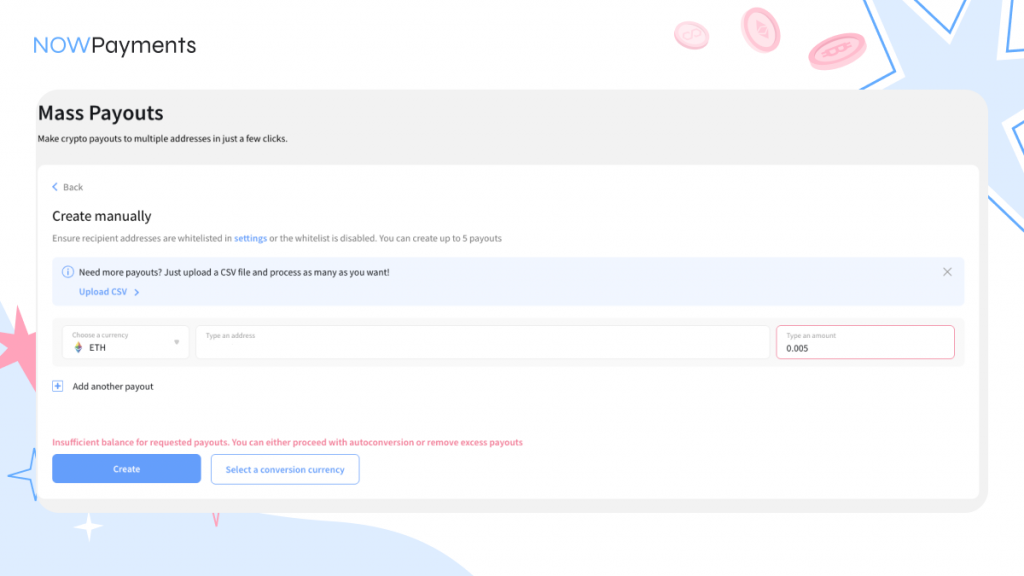
This allows the partner to continue the payout flow without switching to a separate conversion step.
- Choose a conversion currency
After clicking the button, the partner will see a list of coins available for conversion. The selector shows only those currencies that meet the required conditions.
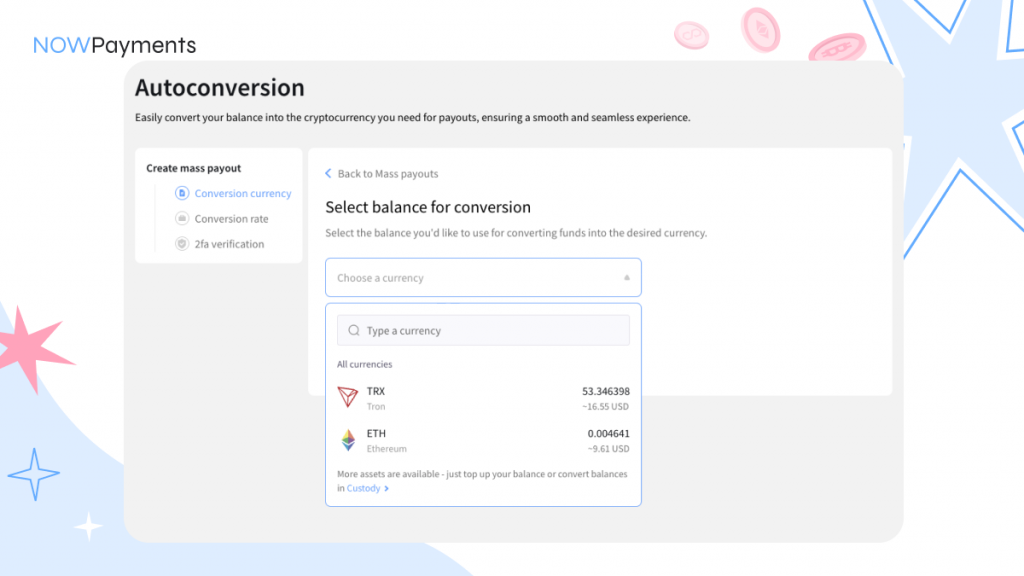
A coin will only show up in the list if:
- its balance is more than $1, which is the least amount it can be converted to
- it has enough money in its account to cover the missing amount needed for the payout
- the system checks that the coin can be used in the current payout situation
For instance, if one partner is $5 short and the other partner’s coin balance is only $4, the selector will not show that coin.
If no suitable coins are available, the partner will be prompted to add to their custody balance.
- Confirm the conversion rates
After choosing a coin, the next step is to confirm the rate.
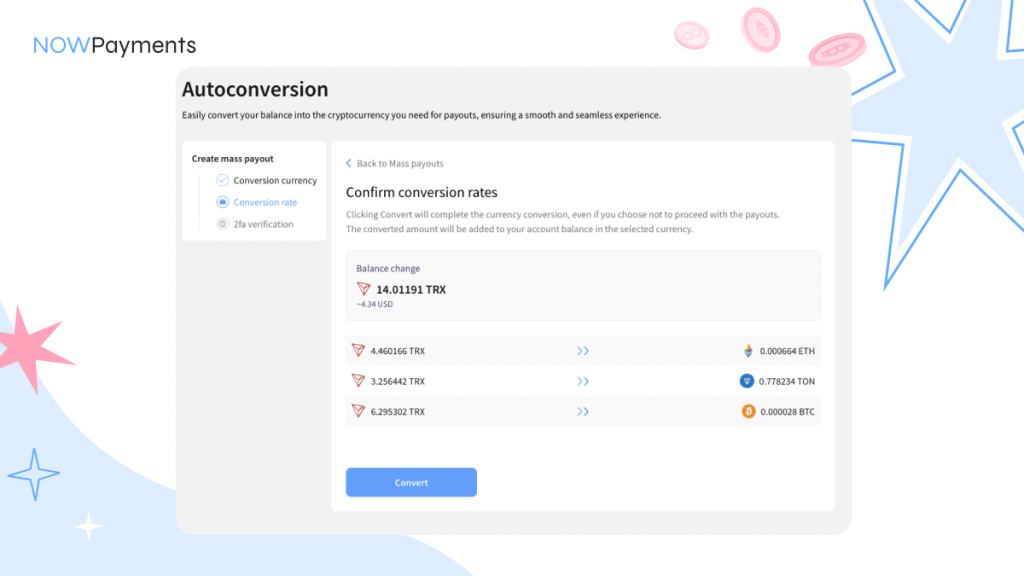
At this stage, the dashboard displays:
- the coin being converted
- the coin that will be used for the payout
- the amount to be converted
- the estimated amount to be received
The estimate is refreshed every 30 seconds, so the displayed rates stay up to date during confirmation.
- Confirm the payout with 2FA
After the rates are confirmed, the payout still requires 2FA confirmation.
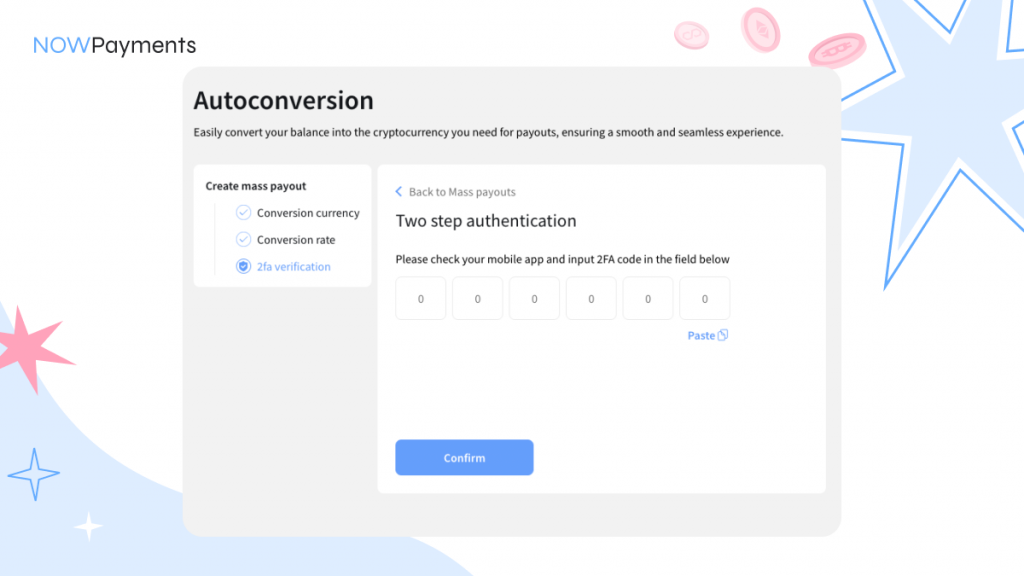
NB. The conversions are created after the rates are confirmed, while the payout itself is completed only after the 2FA step. If a conversion is required, the payout will wait until that conversion is completed and the required balance becomes available.
Which Coins Appear for Conversion
The selector is designed to show only practical options. It does not display every balance on the account, but only the coins that can actually cover the shortfall.
This makes the flow easier to use and prevents partners from picking an asset that still would not be enough to complete the payout.
NB. It is also important to remember that the minimum conversion amount is $1. Even if the payout is missing only a few cents, the conversion must still meet that minimum threshold.
Important Conditions to Know
- Auto-conversion is currently available only in Mass Payouts. It does not work for payouts created directly from the Custody page.
- The feature also works only if the Withdrawal fee paid by parameter is set to Receiver. If another fee option is selected, the auto-conversion flow will not be offered when the balance is insufficient.
- At the moment, this functionality is available only in the dashboard. It is not supported via API.
- Another important rule is that payouts always wait for conversions to finish. A payout will not begin processing until the required balance in the payout currency is available.
Final Thoughts
Auto-conversion for Mass Payouts makes the payout flow more flexible and more practical for partners who work with multiple assets. They no longer have to stop and do extra steps manually when they receive an insufficient balance message. Instead, they can fix the problem right on the dashboard. This means less friction, fewer interruptions, and a smoother way for teams that regularly make payouts to go.
FAQ
Does this feature work only for Mass Payouts?
Yes. You can only use auto-conversion in the Mass Payouts flow on the NOWPayments dashboard. When you ask for a payout directly from the Custody page, it does not work.
What happens if there are no available coins for conversion?
If there is no coin with enough balance to cover the missing amount, the system will not offer auto-conversion. Instead, the partner will be prompted to top up their Custody balance.
Is there a minimum amount for conversion?
Yes. The minimum conversion amount is $1. This means that even if the payout is short by only a few cents, the missing balance can only be covered through a conversion of at least $1.
When are conversions created, and when is the payout created?
Conversions are created immediately after the rates are confirmed. The payout itself is created only after 2FA confirmation.
Will the payout start processing before the conversion is completed?
No. The payout will wait until the conversion is completed and the required balance in the payout currency becomes available. Until then, the payout will not start processing.
What happens if the balance of the source coin changes during confirmation?
If the balance of the coin selected for conversion becomes insufficient by the time the partner clicks “Convert”, the system will return an insufficient balance error.
What happens if the payout currency balance becomes sufficient before the conversion goes through?
If the balance in the payout currency becomes sufficient during the confirmation stage, the system can create the payout without conversion.
Does this feature work through the API?
No. Right now, you can only use auto-conversion for payouts in the dashboard, and the API does not support it.
Is auto-conversion available for all payout fee settings?
No. The feature only works when the parameter for the Withdrawal fee paid is set to “Receiver.” If you choose a different option, auto-conversion will not be available if your balance is not high enough.