
A USDT transfer on TRON can cost a business almost nothing, or more than 13 TRX. The amount being sent has nothing to do with it. What matters is whether the sending address has Energy, whether the recipient already holds USDT, and how many times the money moves on-chain before it reaches its final destination.
For a business, the money moves more often than it seems. A customer pays to a deposit address, the funds get moved to a main wallet, and later they go out again as payouts, refunds, or withdrawals. Each of those steps is a separate transfer with its own cost. Below we break down where those costs come from and how to cut them on both sides: when you receive USDT and when you send it.
Where USDT TRC20 Costs Come From
TRON has no flat gas fee. Every USDT transfer is a call to the USDT smart contract, and it uses two network resources: Bandwidth and Energy. If the sending address doesn’t have enough of either, the network burns TRX from that address to cover the gap.
Bandwidth covers the size of the transaction. A USDT transfer takes about 345 Bandwidth. Every activated address gets 600 free Bandwidth a day, which covers one transfer. After that, the network burns 1,000 sun per unit, or roughly 0.35 TRX per transfer.
Energy covers the work the smart contract does, and this is where most of the cost sits. A transfer to an address that already holds USDT needs about 65,000 Energy. A transfer to an address that has never held USDT needs about twice as much, because the contract has to create a new balance record for it. Without Energy, the network burns TRX at 100 sun per unit.
| Transfer | Energy needed | TRX burned without Energy |
| To an address that holds USDT | ~65,000 | ~6.5 TRX |
| To an address with no USDT | ~130,000 | ~13 TRX |
At a TRX price of about $0.32, that’s roughly $2 to $4 per transfer, plus Bandwidth once the free daily allowance runs out.
For a business, these costs show up in three places:
- Incoming payments. The customer pays for their own transfer, but the USDT lands on a deposit address. Moving it from there to your main wallet is a second transfer, and payment processors usually pass its cost on to the merchant as a network fee.
- Sweeps. If you run your own deposit addresses, each one needs Energy, or TRX to burn, before its balance can be moved.
- Outgoing transfers. Every payout, refund and withdrawal is a full transfer, and costs double when the recipient has never held USDT.
Receiving: Cut Deposit Fees with NOWPayments
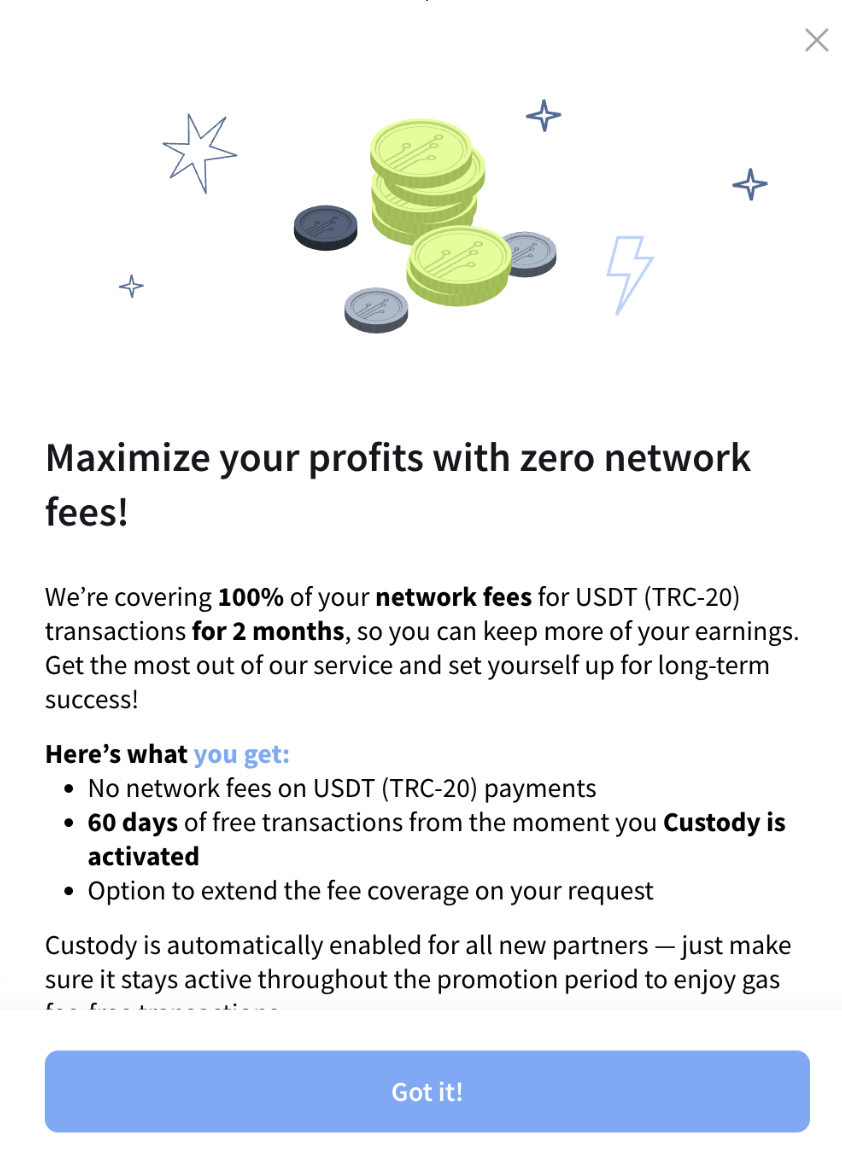
On the receiving side, the cheapest network fee is one you don’t pay. NOWPayments covers network fees on incoming USDT TRC20 payments for new partners: 0% for the first 60 days, as long as Custody is active. Custody is switched on by default for new accounts, so the only thing to watch is that it stays on for the whole period. Partners can also ask to extend the coverage.
To use it:
- Sign up as a new NOWPayments partner.
- Keep Custody activated.
- Accept USDT TRC20 through any NOWPayments integration, such as invoices, the API or an e-commerce plugin.
Custody keeps saving money after the promotion ends. Payments stay on your NOWPayments balance instead of being forwarded to your wallet one by one, so you can withdraw in fewer, larger amounts. Fewer on-chain transfers means fewer fees, and that idea runs through the rest of this guide.
Sending: Rent Energy Instead of Burning TRX
Once USDT leaves your wallet, the network fee is yours. Payouts to users or contractors, refunds, withdrawals, and sweeps from your own deposit addresses all need Energy on the sending address. There are three ways to get it.
Burn TRX. If you do nothing, the network burns about 6.5 TRX per standard transfer. It needs no setup, and it is the most expensive option.
Stake TRX. Staking TRX gives an address Energy that refills every 24 hours. How much depends on how much TRX the whole network has staked. Today, 1 staked TRX gives about 9.7 Energy a day, so covering one standard transfer a day takes roughly 6,700 TRX. The transfers are then free, but the capital is locked, and getting it back takes a 14-day unstaking period.
Rent Energy. Energy providers stake TRX themselves and delegate Energy to your address for a fee, usually for one hour. You pay per transfer, lock up nothing, and can change volume from one day to the next.
| Burn TRX | Stake TRX | Rent Energy | |
| Cost per standard transfer | ~6.5 TRX | No fee | ~1.2 to 1.8 TRX |
| Capital locked | None | ~6,700 TRX per daily transfer | None |
| Getting out | Nothing to undo | 14-day unstaking | Stop ordering |
| Fits best | Occasional transfers | Steady volume and spare TRX | Variable or growing volume |
TRONAgg is one way to rent. It sources Energy at the best available market rate and sets one price per hour. On November 12 that price was 24 sun per unit, while the average across 10 other providers was about 54 sun. Depending on the hour, a standard USDT transfer costs about 1.0 to 1.8 TRX this way, 70 to 85% less than burning. Energy reaches the address within seconds, orders that can’t be filled are refunded automatically, and you can order through the website, a Telegram bot, or the API. The API matters most for businesses: a payout or sweep script can request Energy right before it sends.
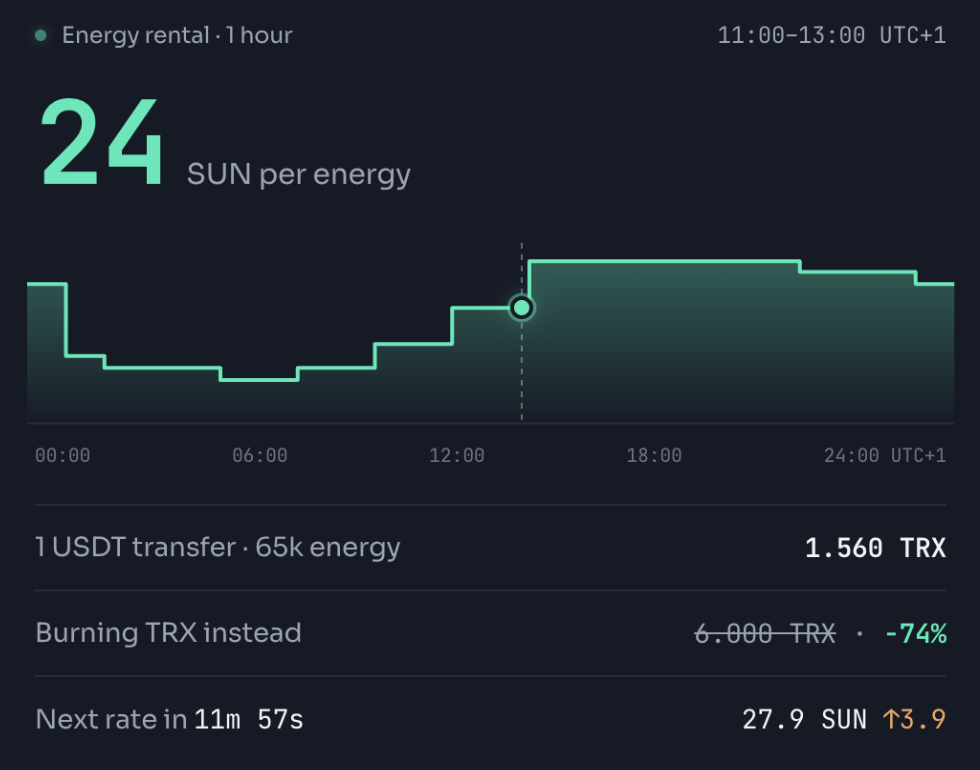
TRONAgg sets one Energy price per hour. At 24 sun per unit, a standard USDT transfer costs 1.56 TRX instead of about 6.5 TRX burned.
What This Looks Like Over a Month
Say a business sends 2,000 USDT payouts a month, all to addresses that already hold USDT.
- Burning TRX: 2,000 × 6.5 = 13,000 TRX, about $4,100.
- Renting at 1.56 TRX (the November 5 rate): 3,120 TRX, about $990.
- Staking: around 67 transfers a day would need about 450,000 TRX locked, roughly $143,000.
Renting saves about 9,900 TRX, or $3,100, a month compared with burning, without tying up capital.
Two things to keep in mind:
- Sweeps need Energy on each deposit address. The deposit address is the one sending, so that’s where the Energy goes. Deposit addresses usually hold no TRX, and the alternative is topping each one up with 6.5 to 13 TRX to burn.
- New recipients cost double. Before a payout, check whether the recipient holds any USDT. If not, order about 130,000 Energy for that transfer instead of 65,000.
Batch Payouts and Sweeps
A cheaper price per transfer is half the picture. The other half is how many transfers you make and how you buy Energy for them.
One thing to know first: TRON has no built-in way to send USDT to many recipients in a single transfer. Multisend contracts exist, but the USDT contract still has to update each recipient’s balance, so Energy per recipient stays about the same. Batching saves money in other ways.
- Pay out on a schedule. Daily or weekly payout runs, instead of instant ones, let you combine several amounts owed to the same person into one transfer. A minimum payout amount stops transfers where the fee eats a large share of the value.
- Sweep by threshold, not by payment. Move funds off a deposit address once its balance passes a set amount, or on a fixed schedule, rather than after every payment. Leave dust where the sweep would cost more than it moves. With Custody on NOWPayments, incoming funds already sit on one balance, so you withdraw once instead of sweeping at all.
- Order Energy for the whole run. For payouts from one hot wallet, place a single order sized for the batch: 65,000 Energy per standard transfer and 130,000 per new recipient. Then send the whole batch within the rental window, usually one hour. Sweeps are different, since each deposit address needs its own Energy.
- Pick cheaper hours. Rental prices change through the day and the week. A payout run that can wait a few hours can be timed for a lower rate.
- Don’t forget Bandwidth. A wallet sending hundreds of transfers a day uses up its 600 free Bandwidth on the first one. After that, each transfer burns about 0.35 TRX, unless you stake roughly 210 TRX for Bandwidth per daily transfer.
If your payouts already run through NOWPayments, Mass Payouts takes a whole batch as one API request or a CSV upload, which makes scheduled runs easy to set up.
Zero-fee payouts by email with ChangeNOW Pro
There is one more way to cut payout costs: skip the on-chain transfer altogether. With ChangeNOW Pro Payouts, a NOWPayments merchant sends crypto using only the recipient’s email address. The funds go to the recipient’s ChangeNOW Pro account, which is created automatically for new users, so there are no wallet addresses to collect or check. These payouts come with zero network and service fees.
This suits affiliate commissions, creator payouts, referral rewards, bonuses, and other programs with many recipients. There are two ways to send them:
• From the dashboard. In Mass Payouts, choose the ChangeNOW Pro option, then upload a CSV file or enter emails and amounts manually. You can pay anywhere from 1 to 100,000 recipients.
• Through the API. Use the same NOWPayments payout endpoint and put the recipient’s email in the address field. One batch can mix ChangeNOW Pro and regular on-chain payouts.
Recipients get an email with instructions to collect their funds and activate their account. For payouts that still need to go on-chain, the Energy and batching tips above apply.
Where to Start
Most businesses can cut their USDT TRC20 costs by more than half without changing how they work with customers. A good first pass:
- Check what incoming payments cost you. If you’re new to NOWPayments, keep Custody on to get 60 days of 0% network fees on USDT TRC20.
- Count last month’s outgoing transfers. Split them by recipients that held USDT and those that didn’t, then multiply by 6.5 and 13 TRX. That’s what burning costs you today.
- Compare with renting and staking. Price the same volume with rented Energy, and work out how much TRX staking would lock up.
- Batch what can wait. Scheduled payouts, threshold sweeps and one Energy order per run.
Conclusion
USDT TRC20 fees look small one transfer at a time. For a business they add up, because the same money moves several times: in from customers, off deposit addresses, and out again as payouts and refunds.
Each of those steps has its own fix. NOWPayments removes the network fee on incoming USDT TRC20 payments for new partners, renting Energy through TRONAgg makes outgoing transfers several times cheaper than burning TRX, and batching cuts the number of transfers you pay for in the first place. Your customers won’t notice any of it. Only your network bill will.