
Accepting cryptocurrency allows businesses to reach global customers and manage payments across borders, but handling digital assets also comes with security risks. Compromised accounts, unauthorized withdrawals, and incorrect deposits can lead to financial losses, operational delays, and additional work for finance teams.
NOWPayments provides security controls for managing these risks across payment processing, payouts, and account operations. Here’s how they work, what they protect against, and where merchants can configure them.
What Security Measures Does NOWPayments Offer?
Crypto payment security involves more than protecting an account password. Businesses also need control over payout destinations, incoming deposits, and automated payment processing.
NOWPayments provides security measures for different stages of these operations.
| Security Measure | How It Works | Business Risk Addressed |
| Wallet whitelisting | Restricts withdrawals to approved crypto addresses | Unauthorized payout destinations |
| IP whitelisting | Restricts withdrawal requests to approved IP addresses | Withdrawal requests from untrusted sources |
| Two-factor authentication | Adds verification for account access and sensitive operations | Compromised credentials and unauthorized actions |
| Deposit protection | Handles eligible wrong-asset deposits and configurable payment statuses | Payment errors, underpayments, and reconciliation issues |
| KYC, KYB, and AML | Applies identity verification and risk-based monitoring | Financial crime and compliance risks |
| API and IPN security | Authenticates API requests and verifies payment notifications | Unauthorized API requests and untrusted payment updates |
Merchants can manage several of these settings directly from the NOWPayments dashboard, while KYC and AML checks are handled through the platform’s compliance procedures.
Security Across Your Crypto Operations
Control account access, restrict withdrawals, manage deposits, and protect automated payment flows.
Account Access
Two-factor authentication for account login and protected operations.
Withdrawals
Wallet and IP whitelisting restrict destinations and request sources.
Deposits
Configurable handling of payment errors, repeated deposits, and underpayments.
Compliance
KYC, KYB, and AML procedures support verification and risk assessment.
API Integration Security
Authenticated requests and signed payment notifications.
You can review and configure the available security measures in your NOWPayments dashboard .
Wallet and IP Whitelisting: Restrict Unauthorized Withdrawals
Crypto withdrawals can be difficult or impossible to reverse once funds reach an external wallet. Businesses managing payouts therefore need control over both the destination of funds and the systems authorized to initiate transfers.
NOWPayments provides wallet and IP whitelisting for these purposes. Both restrictions are enabled by default and can be managed through the merchant dashboard.
Wallet Address Whitelisting
Wallet whitelisting restricts withdrawals to cryptocurrency addresses approved by the merchant.
For example, a company might maintain separate wallets for treasury operations, supplier payments, and contractor payouts. Each trusted address can be added to the whitelist, while transfers to other destinations remain restricted.
How to whitelist a wallet address:
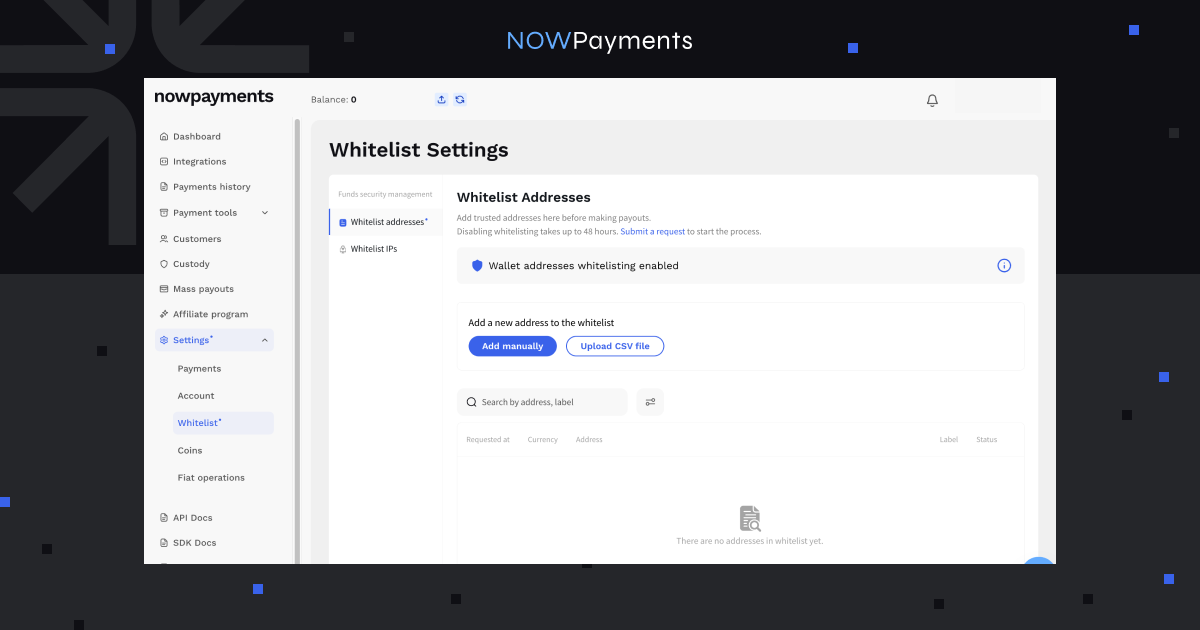
- Open Whitelist Settings → Whitelist Addresses in the NOWPayments dashboard.
- Select Add manually or Upload CSV file to submit addresses.
- Enter the relevant wallet details and assign a label where needed.
- Confirm the request using the 2FA code sent by email.
- Check that the address has been added successfully before initiating a payout.
The whitelist section displays the requested date, currency, address, label, and current status.
The confirmation code remains valid for 15 minutes. If the code expires or the request is not confirmed, the address remains in Requested status and must be submitted again.
Wallet labels also help businesses identify payout destinations without checking every character of a cryptocurrency address, particularly when several employees work with the same payout infrastructure.
IP Whitelisting
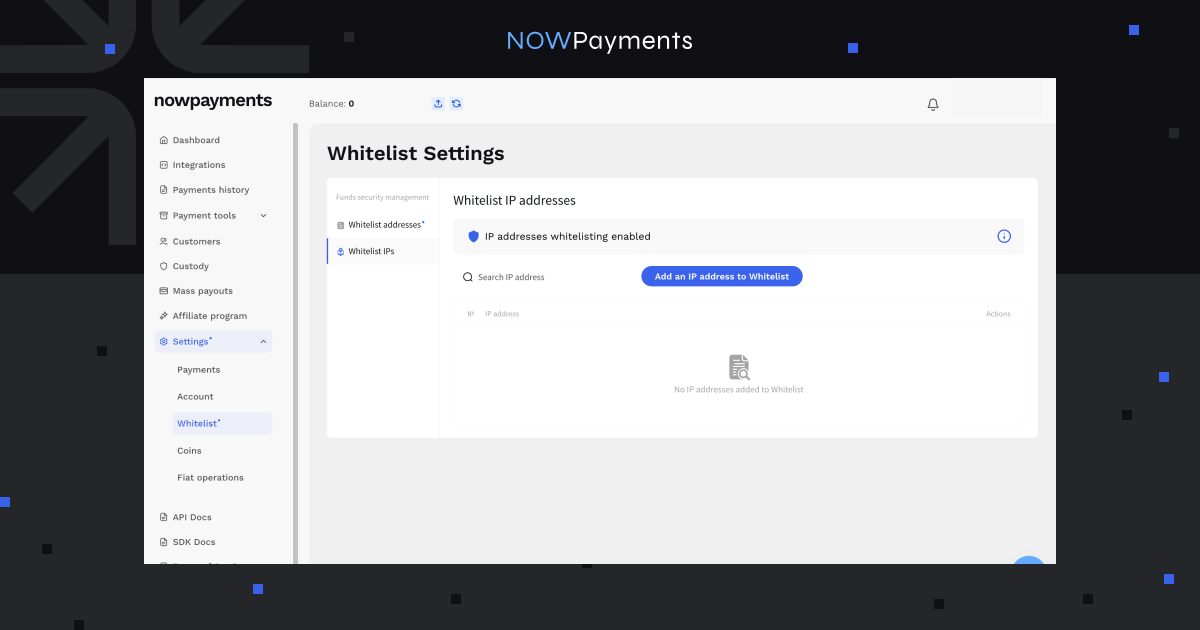
IP whitelisting restricts withdrawal requests to approved IP addresses.
A business using its own backend to initiate payouts can add the IP addresses of its authorized servers. Requests originating outside the approved list are restricted while this measure is enabled.
Merchants can configure these addresses under Whitelist Settings → Whitelist IPs.
Wallet and IP whitelisting serve different purposes:
- Wallet whitelisting determines where business funds can be withdrawn.
- IP whitelisting determines where withdrawal requests can originate.
NOWPayments allows merchants to request that these protections be disabled. According to the current dashboard information, disabling wallet whitelisting takes up to 48 hours, while a request to disable IP whitelisting is processed within one business day.
Removing either restriction increases the risk of unauthorized withdrawals, so businesses should consider the security implications before changing these settings.
Whitelist Management for Business Teams
Businesses with multiple employees can manage whitelist access through NOWPayments’ multi-user permissions.
Sub-users can be assigned three permission levels:
- View: allows access to whitelist information and statuses.
- Edit: permits management of addresses, labels, and IP settings.
- Disable: hides the whitelist section from the sub-user.
Critical confirmations remain under the master account’s control, allowing businesses to delegate routine whitelist management without giving every employee full authorization privileges.
Learn more in the NOWPayments whitelist security update.
Two-Factor Authentication: Protect Account Access and Withdrawals
A compromised password can expose account settings, balances, and payout operations. Two-factor authentication (2FA) adds another verification step to help prevent unauthorized account activity.
NOWPayments supports 2FA for account login and protected financial operations, including custody withdrawals and whitelist changes.
How 2FA Works in NOWPayments
Merchants can configure login authentication under Account Settings → 2FA.
Depending on the configuration, verification codes can be received by email or generated through an authenticator application.
When login 2FA is enabled, a user entering the correct password must also provide a valid verification code before accessing the account.
Additional verification is used for protected operations, including:
- Confirming wallet whitelist requests.
- Authorizing custody withdrawals.
- Approving certain payout operations.
For mass payouts, NOWPayments supports verifying a batch of transactions with a single 2FA code.
Withdrawal 2FA is part of the standard custody security configuration, although merchants can formally request an exception.
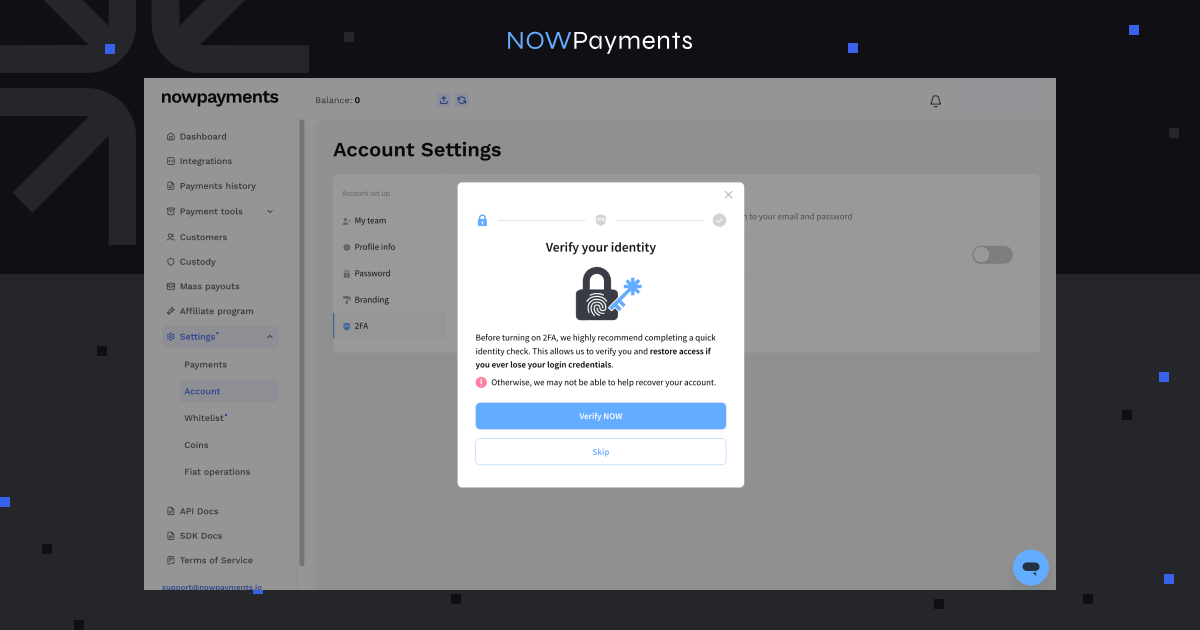
If an employee’s login credentials are compromised, enabled login 2FA requires an additional verification step before an attacker can access the account. For businesses managing crypto balances and payouts, this reduces reliance on passwords alone.
Deposit Protection: Reduce Payment Errors and Manual Processing
Incorrect crypto deposits can delay order fulfillment and create additional reconciliation work. NOWPayments provides settings for handling eligible payment errors and determining how received deposits should be recorded.
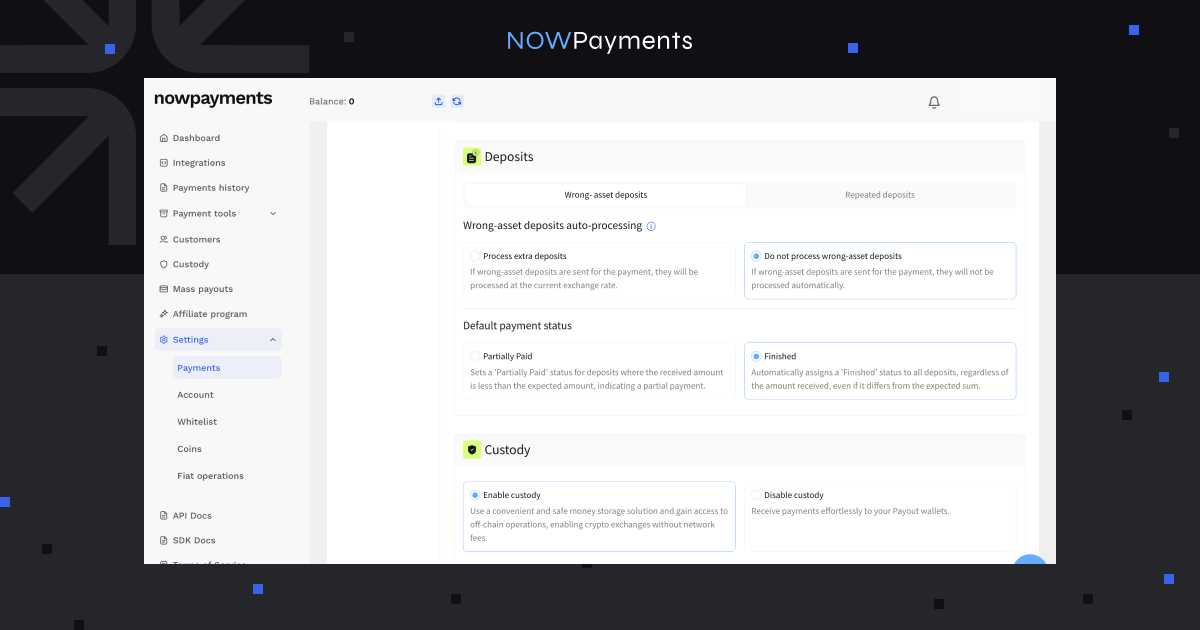
Wrong-Asset Deposit Auto-Processing
A wrong-asset deposit occurs when a customer sends a different supported cryptocurrency or uses a different supported network than the one specified in the original payment.
For example, a customer may send USDT on BNB Smart Chain when the checkout requested USDT on Ethereum.
When wrong-asset deposit auto-processing is enabled, NOWPayments can process eligible deposits using the applicable exchange rate.
Merchants can configure the following options:
| Setting | How It Works |
| Process extra deposits | Automatically processes eligible wrong-asset deposits at the current exchange rate |
| Do not process wrong-asset deposits | Does not process wrong-asset deposits automatically |
The feature applies to supported cryptocurrencies and networks. It does not guarantee that funds sent using unsupported assets or networks can be recovered.
For businesses receiving many customer payments, automatic processing can reduce the number of incorrect deposits requiring manual investigation.
Where to find it: Payment Settings → Payment Details → Deposits.
Repeated Deposits
Customers sometimes send another transfer to an address previously used for a payment.
NOWPayments supports processing repeated deposits and identifying them in Payment History. Merchants can review these transactions separately and check the received amount and currency.
This helps businesses reconcile additional transfers without treating every deposit as a completely new order.
Managing Partial Payments and Underpayments
Another important setting determines how deposits are marked when the received amount differs from the amount originally requested.
NOWPayments provides two status options for relevant deposit handling:
| Status | Behavior | Typical Business Use |
| Partially Paid | Identifies deposits below the expected amount | E-commerce and fixed-price orders |
| Finished | Marks processed deposits as completed even if the received amount differs | Gaming deposits and account balance top-ups |
For e-commerce businesses, the amount paid should generally match the order value before fulfillment.
For example, if a customer purchases a $100 product but sends only $80, the merchant may want the order to remain partially paid until the remaining amount is received.
For gaming platforms and balance-based services, the received amount may instead be credited directly to the customer’s balance.
In either case, merchants should verify the actual received amount and currency rather than relying on payment status alone.
For further guidance, see Best Integration Practices for Crypto Payments with NOWPayments.
KYC, KYB, and AML: Managing Compliance Risks
Businesses processing cryptocurrency also face risks related to suspicious transactions, sanctions exposure, and the identity of the parties involved.
NOWPayments applies Know Your Customer (KYC), Know Your Business (KYB), and Anti-Money Laundering (AML) procedures to support verification and financial crime risk management.
These procedures are described in the official NOWPayments AML and KYC/KYB Policy.
KYC and KYB Verification
KYC procedures are used to identify and verify individuals where required. KYB focuses on businesses, their registration details, and ownership structures.
Depending on the circumstances, verification may involve:
- Identity documents and proof of residence.
- Company registration certificates.
- Information about company directors.
- Details of ultimate beneficial owners.
- Supporting documents related to business activities.
NOWPayments may also use third-party verification providers and additional identification methods when appropriate.
Verification requirements are risk-based, meaning the information requested can vary depending on the customer and circumstances.
AML Monitoring and Risk Assessment
NOWPayments’ AML procedures include transaction monitoring, sanctions screening, and additional checks where suspicious activity or higher risks are identified.
These procedures may involve reviewing transaction patterns, requesting supporting information, and conducting enhanced due diligence.
For merchants, this provides a compliance risk management layer alongside the security controls available in their accounts. Businesses must still assess and meet their own regulatory obligations based on their activities and jurisdictions.
Additional Security for API Integrations
Businesses integrating NOWPayments through their websites, applications, or backend systems also need to secure automated operations.
Two credentials are particularly important:
- API Key: used to authenticate requests sent from a merchant application to NOWPayments.
- IPN Secret Key: used to verify Instant Payment Notifications received from NOWPayments.
When a transaction status changes, NOWPayments can send a payment notification to the merchant’s configured callback URL.
The notification includes a signature in the x-nowpayments-sig header. The merchant’s backend should verify this signature before accepting the notification as authentic.
Businesses should also account for duplicate notifications and avoid triggering the same order fulfillment or balance credit more than once.
Technical instructions are available in the NOWPayments API documentation.
How to Secure Your NOWPayments Account
Merchants should review their security configuration before processing payments and payouts.
- Secure account access. Enable login 2FA and review employee permissions.
- Restrict withdrawals. Add trusted payout destinations and configure IP whitelisting.
- Review deposit settings. Configure wrong-asset auto-processing and select payment statuses appropriate for your business model.
- Protect API integrations. Secure authentication credentials and verify payment notification signatures.
- Keep settings updated. Review access permissions, wallet addresses, and authorized IPs whenever operational requirements change.
Most of these settings are available directly in the NOWPayments dashboard.
Conclusion
Crypto payment security depends on how businesses manage account access, payouts, incoming deposits, and compliance risks. NOWPayments provides controls for each of these areas, helping merchants reduce exposure to unauthorized transactions and avoid preventable payment issues.
Review your account configuration in the NOWPayments dashboard to make sure the available security measures match your business operations.
FAQ
Is NOWPayments secure for business crypto payments?
NOWPayments provides several security measures, including two-factor authentication, wallet and IP whitelisting, deposit handling controls, and KYC/AML procedures. Businesses can also secure automated integrations using API authentication and verified payment notifications.
What is wallet whitelisting in NOWPayments?
Wallet whitelisting restricts withdrawals to approved cryptocurrency addresses. Merchants can add trusted addresses manually or through CSV upload and confirm whitelist changes using 2FA.
Can I disable wallet or IP whitelisting?
Yes. Merchants can request to disable these restrictions. According to the dashboard information, disabling wallet whitelisting takes up to 48 hours, while IP whitelist disablement requests are processed within one business day. Removing either restriction increases the risk of unauthorized withdrawals.
Does NOWPayments support two-factor authentication?
Yes. NOWPayments supports 2FA for account login and sensitive operations, including custody withdrawals and whitelist changes. Login authentication can be configured through the merchant’s account settings.
What happens if a customer sends cryptocurrency on the wrong network?
If wrong-asset deposit auto-processing is enabled, NOWPayments can process eligible deposits sent using a different supported asset or network. Unsupported transfers may not be recoverable.
Does NOWPayments require KYC?
NOWPayments applies risk-based KYC and KYB procedures. Verification may be requested depending on the customer, business profile, transaction activity, and applicable compliance requirements.